


2018 School Spending Survey Report
Of Mice and Mentors: Keisa Williams
An educator with great tech plans finds she must start at the very beginning
Things are buzzing at the Monarch Library, where a class of 20 first graders is working intently on laptops. On screen, the current application is Big Universe, a picture-book site, where some kids are busy reading books, while others are browsing the program for their next title. No big deal. But to Keisa Williams, Monarch’s librarian, it’s simply “awesome.” Surveying the scene, she says, “There have been a few times when I’ve welled up at this.”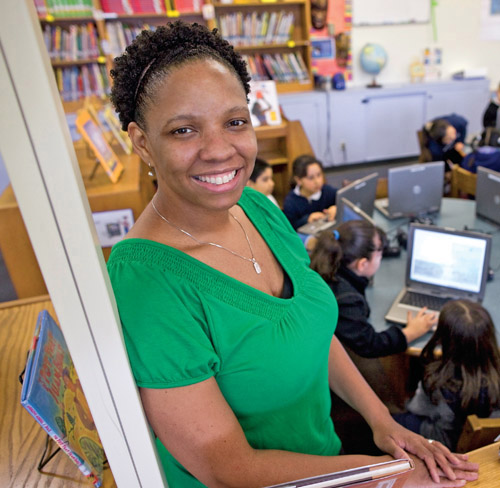
Photograph by David Paul Morris/Getty Images for SLJ.
The cool, composed Williams (pictured, above) comes by her emotions honestly. She and her students at Monarch Academy, a K–5 charter school in Oakland, CA, have worked hard to get to this point. Just four months ago, these same students couldn’t operate a mouse, much less log in to and operate a digital program. By February—as seems fitting by the second decade of the 21st century—the kids had become capable computer users, able to tackle a range of activities and the Web and ready for the next new thing their technologically adventurous librarian was waiting to throw at them. Helping these kids gain competency in an aspect of contemporary life that most people take for granted was “a journey,” as Williams calls it, and for the rest of us, an example of professional dedication, the resiliency of children, and their capacity to learn. Located in East Oakland, Monarch Academy serves an urban community—98 percent of the 352 students qualify for free or reduced-price lunch, 97 percent are English-language learners, and three percent are African American per official stats. About 50 percent of students have computers at home, estimates Williams, but not all of them have access to the Internet, and their parents’ tech experiences are probably pretty slim. As for cell phones—increasingly critical tools as more and more of our lives go mobile—Williams would be shocked if a single student had one. Still, Williams had no idea of the high hurdle she’d have to clear when she began the current school year. Fully versed in the latest 2.0 applications and networked, via Twitter, with fellow leaders on the cutting edge of education technology, the librarian was raring to go last fall. Armed with a slew of new project ideas—everything from blogging to digital story telling—Williams couldn’t wait for her students to finally get hands-on with technology. Now in her fourth year at the school, she had seen the media center’s equipment stash swell from a paltry six student computers to 30 laptops, thanks to Monarch’s founding principal, Tatiana Epanchin, who, before she left the school last year, shifted one of the school’s laptop carts to the library. In another windfall, Williams also received a Promethean interactive whiteboard, making Monarch’s the only library in the district to have one. But from the start, there was trouble. “I didn’t know until I put them in front of the computer. I assumed they knew what to do,” recalls Williams of what happened in the fall. “I assumed wrong.” The kids had obviously never handled a laptop computer, much less worked on one, as Williams, holding her breath, observed the youngsters’ awkward attempts to pull out and sit in their chairs, while at the same time balancing $1,000 laptops. Once they opened the computers—with the librarian’s help—the students struggled with the trackpad and couldn’t manage the mouse. Clicking was another foreign concept. “I’ve been using computers for years, and, frankly, it didn’t occur to me that we might spend so much time distinguishing among clicking behaviors,” says Williams of the resulting right-click-left-click and then there’s double-click conundrum. Another problem, of course, was that many younger students didn’t know their left from their right. This called for a radical change in plans. Setting aside her sophisticated tech plans, such as using tools like SpellingCity, a free Web program with a game-style learning interface, for vocabulary instruction, Williams devoted each of her 50-minute sessions to working on the basics. Lesson number one? Log in, log out—return the laptops to the cart. Later on students practiced maneuvering using a trackpad, click-and-drag, control/alt/delete, and other key combinations. (For more lesson details, see “What Works.”) Williams aired some of her frustration with keyboarding lessons on Twitter, which garnered a response from Ira Socol (@Irasocol), a special education technology scholar at Michigan State University’s College of Education. He suggested she reconsider traditional keyboarding, an outdated skill that doesn’t jibe with the varied, real-world methods of content entry, including texting via phone keyboards. Concerned as well about the potential for repetitive motion injuries, Williams looked into assistive technologies, but her budget wouldn’t accommodate purchasing alternative mice and other ergonomic equipment. She opted instead for what she calls a more organic way to familiarize students with text entry: the two-finger hunt-and-peck method. Things went very slowly. “As much as I wanted to, I couldn’t rush,” says Williams. But in a few months’ time, she witnessed the payoff—the kids were comfortable working on their laptops. “Click, scroll, drag,” says Williams, ticking off the moves, “no problem.” Plus, “no one is saying, 'Miss K, I don’t know what to do,’” she says, recalling the running around she would do from student to student, frantically saving their work. Evidence, perhaps, of a deeper achievement, Williams observes, “Now it’s to the point where they’re learning things that I’m not teaching.” One second grader, Paola, who had apparently been watching the librarian closely, figured out how to name a file and save it to the server. “She’s my little helper, now,” Williams says with pride. Monarch’s classroom teachers have also expanded their tech skills, with some encouragement from the librarian. “Keisa’s excitement and passion for integrating technology and media literacy into reading and writing lessons have changed the way I think about reading and writing,” says Siobhan Boylan, a fifth-grade teacher, who is teaming with the librarian on a digital storytelling project. “I’ve never been fond of textbook-type robo-teaching, but I also never thought deeply about having kids use the Internet as an authentic and dependable resource for learning about and exchanging ideas.” Meanwhile, Matt Meyer, a third-grade teacher, has set up a class wiki and signed up for a Delicious account, connecting with the librarian through the social bookmarking site. That’s not to say there haven’t been hiccups along the way. For instance, a risk of Web-based applications played out in one class, when someone’s little sister, playing on a home computer, messed with the talking aliens a class had created on free animation tool Voki. And Boylan has her own challenges, with half of her students reading below grade level and many struggling with the more abstract concepts of fifth-grade math. But for the kids who are behind, she says, “using technology really builds their confidence and feeling of being connected to other learners around the world. In some ways, it lends a purpose to their struggle to catch up in their studies.” For Williams, it will be a while, she says, before she comes full circle on her technology integration journey. While the kids are making great strides, she has decided to put off blogging, and her account on open-source course management system Moodle, little used, has gone dormant. But that’s fine by her. “It’s like building a house: you must begin with a strong foundation,” Williams says of her measured process for introducing technology. “We will eventually get there.”Some library-tested teaching tips for introducing technology By Keisa Williams How to use the trackpad I demonstrated how to use the trackpad and then each student practiced on her/his own. To prevent scratching the trackpad, I explained that it was sensitive, like the skin on the tip of their nose. I touched my nose with the soft tip of my index finger and had them do the same. I then had them repeat the touch, but this time with their fingernail. We moved from our noses to the trackpad. In hindsight, the tip of the nose is too close to being inside the nose; next time, the back of the hand. Students also had difficulty using the trackpad and left-click button to scroll or drag. We practiced several times using one- and two-hand techniques while playing a variety of mouse skill games (see below). A favorite of the kindergarten class is popping bubble wrap. Encouraging hygiene “Do not put your fingers inside any of the holes in your face” was our rule. Working with elementary students, I must cover hygiene. I talk about germs and how they spread. Then I focus my Zoom Scope TV microscope on a computer keyboard and project the image on the whiteboard. Once students see the germs on the big screen, they get it. I also wear a pin of a Simpson’s character with his finger in his nose. If I see a student with hands close to their face, I point to the button and say, “Nose,” and they stop. Introducing new vocabulary I hadn’t considered that a third of my students had never touched a laptop and only half of them have computers at home. Even those with some experience weren’t familiar with technology-related terms, such as cursor, icon, shortcut, space bar, URL, and links. I used the BBC’s Computer Tutor to reinforce this vocabulary. Mastering key combinations It’s tricky learning how to press the ctrl+alt+delete key combinations in order to log in to the network. Using a huge keyboard on the wall, I modeled how to press the keys in sequence. The students also had a habit of using the caps-lock key instead of the shift key when making capital letters. In my first-grade classes, students practiced typing the alphabet and used the shift key to make a capital letter when they reached the initial of their first name. Clicking Another assumption I had was that clicking is intuitive. “Click on the link. When I say 'click’ it always means left click,” I would have to say. “When we click on a link, that is a single click. Clicking on an icon on the desktop is a double click.” I used song tempo to explain how fast they need to double click. The pressure used on a keyboard needed to be addressed. “Touch the keys like they are hot, without banging on the keyboard.” The left-click button is all about what you want the computer to do, the right-click button allows you to see the options in a menu. To help kids distinguish left from right, I have them hold their hands up in front of them, positioning the index fingers and thumb—the hand that looks like the letter 'L’ is the left hand. Dealing with pop-ups I had to explain pop-ups, which inform the user of the network connection after logging in, among other notifications. I didn’t want them to arbitrarily click the 'X’ for every popup, so I stressed the importance of reading the pop-up, which represents a message from the computer, then they can figure out what they need to do next. Mouse Skills Games and Resources BBC’s Computer Tutor Learn how to use a mouse, keyboard, and computer screen. Internet4Classrooms List of Early Childhood Mouse Skills Resources Tina’s World from the Game Goo Website Help Tina find the bugs, using your mouse or trackpad, as you practice listening and following three-step directions. Dress the Teddy Bear Practice dragging and dropping with this simple flash game. Alphabetical Order by ABCya! Practice dragging and dropping while placing the letters in alphabetical order. Contains ads. Mouseaerobics by the Central Kansas Library System May be used for upper elementary-adult learners. Mouse Exercises Exercises to practice placing the mouse, clicking, drag and drop, and drawing with a mouse.

Added To Cart
RELATED


RECOMMENDED
CAREERS
The job outlook in 2030: Librarians will be in demand
CAREERS
The job outlook in 2030: Librarians will be in demand
ALREADY A SUBSCRIBER? LOG IN
We are currently offering this content for free. Sign up now to activate your personal profile, where you can save articles for future viewing
ALREADY A SUBSCRIBER? LOG IN
Thank you for visiting.
We’ve noticed you are using a private browser. To continue, please log in or create an account.
Add Comment :-
Be the first reader to comment.
Comment Policy:
Comment should not be empty !!!