


2018 School Spending Survey Report
Looking to Ramp Up Your Library Web Site? Try a Blog.
Putting Your Best Foot Forward
Does your library Web site feel a bit flat or just plain boring? Do you wish you could interact with students on your site and share more of your passion for learning? Then consider turning your site into a blog. Blogging software lets you update your site easily and keep it current. LeighAnn McCready, teacher librarian at Milpitas (CA) High School, converted to a blog three years ago. “I created it when I initially arrived on campus because staff Web pages had to be submitted to the site webmaster and then converted to PDFs, which meant I couldn’t have a dynamic page that changed often,” she explains. “This [blog] was my workaround.” New content, of course, appeals to students, accustomed as they are to Facebook, where content changes frequently via the news feed.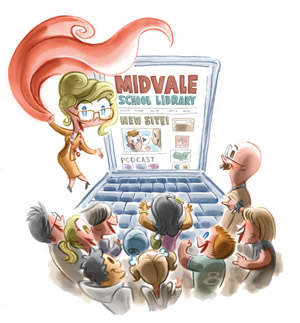
Illustration by Kevin Kobasic.
For a while, I’d been thinking that my library site had grown pretty static. Sure, I kept it updated, but I had this notion that the content had to somehow look the same each time students visited it. Meanwhile, I kept thinking of the dynamic sites that students use routinely and wondered if maybe I could ramp things up to really capture their interest and keep them coming by the library page more often. I’ve been a devoted blogger for several years but it wasn’t until this fall that it occurred to me—why not take my library site and make it a blog? So I took the plunge. I created a new front page for the library using blogging software, and voilà: an interactive and dynamic site that I was eager to share with the 2,400 students at my school, Westlake High, in Austin, Texas. Prianka Ghoshal, a Westlake student, says that our new blog format is much more interactive. “At the old site, people mainly used the research links,” she says. “On the new site I think students spend more time looking at 21st-century tools.” These include fun stuff like polls, Flickr feeds, calendars, and visitor maps, which you can easily embed into a blog. Or how about posting YouTube videos of booktalks, CoveritLive for real-time chat or blogging, Slideshare presentations, or Animoto videos? All these elements can enliven your site and ramp up student interest. Blog posts themselves are an opportunity to forge a meaningful connection. “I try to keep my post topics germane to my library, my campus, my school district, my profession, and my world,” says Anna Koval, librarian at Casa Grande High School in Petaluma, CA, whose site, Big House Library, was an SLJ Site of the Month. “And I try to mix it up, so that my local readers, especially my students, get a flavor for what’s going on in the world, while my more far-flung readers get a taste for what’s going on in Petaluma and the Bay Area, from my perspective, of course.”Getting started
The first step is to decide what features you’d like to have on your blog. Take a close look at other sites and note what appeals to you. (Below you'll find recommended sites based on blogs.) Then it’s time to decide the blog’s structure. What could function as more “fixed” content (like your database page)? What pages would you want to update frequently (a section on new books)? Again, visit other blogs to glean some ideas. For example, I pumped up our “About Us” page after reading the clever bio on author Libba Bray’s blog. Other possible pages you may want to include: database links; general research links (public or academic library sources, arranged by subject area); teacher projects/pathfinders; citation/copyright information; and your online catalog.Choosing your software
There are several Web-based blogging tools to choose from, or your district’s Web software may include a blog feature. Among the best-known online applications are Edublogs, Blogger, and Wordpress. Other options in simple blogging software include Tumblr, Weebly, and Posterous, which allows you to post from your phone. Loaded with features, Edublogs is geared for the school community, which might make it more palatable to districts resistant to blogging. However, to eliminate advertising, the service now charges $4 a month. A popular choice among teachers, Edublogs does present a bit of a learning curve. The Unquiet Librarian, a popular blog by Buffy Hamilton, a media specialist at Creekview High School in Canton, GA, runs on Wordpress, and she has found it very easy to use. I use Edublogs, and McCreary, Blogspot.What next?
- Select your blog name and address (i.e. “mytitle.blogspot.com” or “mytitle.edublogs.org”). Here’s your chance to devise a catchy URL, one that’s easily remembered by students.
- Select a template from the choices provided. Choose carefully, as the page arrangement will make it easier or more difficult for your students to find things. Should it be two columns or three? Do you want extra pages displayed across the top or on the side? What colors will be easiest to read?
- Decide what type of content you want to include in your posts. Do you want to cover library events? How about sharing some helpful Web sites? Will you post student photos? (Some districts won’t permit this.)
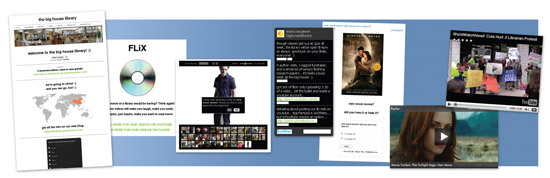
Widgets and other fun elements from the Big House Library site.
What if your district doesn’t permit blogging?
You have a few options. The first is to make a case for using blogs and, in particular, to showcase the library. The American Association of School Librarians’ “Standards for the 21st-Century Learner” or the “National Educational Technology Standards” of the International Society for Technology in Education can help support your cause. Examples of effective blogs can also help. The Blogging Libraries wiki is a good place to start, while Support Blogging provides another good list of choice sites. Then there’s research to back you up. Don Tapscott’s book Grown Up Digital (McGraw Hill, 2008) and the December 2009 study “Networked Learners” by the Pew Internet and American Life Project are two excellent resources worth citing. If you’re still prevented from using outside applications, reconsider the blog options within your district’s software. Our platform, School Fusion, features a blogging tool, which some of our teachers use. Even if you stay with a more standard page rather than switch to a blog, you can still dress up your site with dynamic elements. Polls, database widgets, calendars, Flickr photo feeds, and more can all be embedded. A changing array of photographs on your masthead can help freshen up your site, too. The idea is to make your Web presence more dynamic. It’s not the same as a blog, of course, which allows for student comments, but some simple changes can help convey the look and feel of sites your students are used to. In Urbana, IL, the University Laboratory High School Library site is one example. There, librarian Frances Jacobson Harris has added the library’s Twitter feed to the sidebar, giving a standard Web page a more contemporary feel.Downsides of using a blog
Your blog may not be able to be viewed by schools that block them. There are, thankfully, fewer and fewer of these situations, but if you intend for your site to be viewed by all, it’s something to consider. Foremost, however, is the issue of time. Maintaining a current library Web page with frequently updated posts requires a lot of attention. But if you’re using a Web-based application, you can update your blog from any location at any time, even, as Koval does, in the “wee hours” of the morning. I think you’ll find the benefits of blogging well worth the effort, with the potential of transforming your library presence into an actual destination for students, and one which represents all you and the media center have to offer. Hamilton says her blog serves as “a platform for sharing library news, celebrations, resources, and events of interest with students, teachers, and our library community.” To Koval, “[a blog] is a wonderful way to document what I do without blowing my own horn. I can print out my posts for the year and include them in my annual report to my principal,” she says. Using a blog as your library site can inform students—and administrators—about the many activities going on in your library and the varied curriculum and interests you support, all while functioning as a practical tool for student research. Perhaps best of all, a blog conveys to your students and staff your own passion for learning.Recommended library sites:
Milpitas High School Library Librarian LeighAnn McCready livens up her site with the help of a number of elements, including widgets for LibraryThing and the library’s subscription databases. Big House Library Librarian Anna Koval engages students at the site of the Casa Grande High School Library. Check out the fun polls, photos and videos, and a nice “About Us” page. Westlake High School Library Our library blog offers links and promotes events, while using sidebar widgets like polls and Flickr photo feeds; we create 24/7 access with our “Talk to us” page. Kansas Libraries on the Web project On the public library side, this project helps small libraries create their own simple library blog sites. Park County Library System A conversational style and a clean layout distinguish this small public library’s page. Stillwater Free Library Nice use of social networking icons, an events listing, and Meebo live chat features. Stevens Memorial Library Using a simple, clean layout, this library features its library events and services.Some helpful widget sites:
Clustrmaps Allows you to display a world map showing the location of visitors to your site. Polldaddy Allows the easy creation of embeddable polls and surveys (free). Flickr Photo-hosting site that has an embeddable live feed; as you update photos of your library on Flickr, it updates on your Web site automatically Delicious A social bookmarking service that stores your bookmarks online; you can create sets of bookmarks for students, which can then be displayed on your site. Shelfari, LibraryThing Two services that allow you to create an online library of books. Use the services’ widgets to embed photos of your “bookshelf” on your site. Google Calendar Allows you to embed your library calendar, or any Google calendar. These library blog pages are excellent examples of the power of using widgets: Unquiet Library HarperCollins book jackets, a subscribe feature. National Cathedral School DC Shelfari, embedded videos. Plymouth Regional High School Flickr/Twitter examples. Veteran’s Park Academia Media Blog Meebo chat box. Big House Library Google translate, polls. Milpitas High School Library Embedded Delicious bookmarks. Westlake High School Library Clustrmaps, polls.
Added To Cart
RELATED


RECOMMENDED
CAREERS
The job outlook in 2030: Librarians will be in demand
CAREERS
The job outlook in 2030: Librarians will be in demand
ALREADY A SUBSCRIBER? LOG IN
We are currently offering this content for free. Sign up now to activate your personal profile, where you can save articles for future viewing
ALREADY A SUBSCRIBER? LOG IN
Thank you for visiting.
We’ve noticed you are using a private browser. To continue, please log in or create an account.
Add Comment :-
Be the first reader to comment.
Comment Policy:
Comment should not be empty !!!