You have exceeded your limit for simultaneous device logins.
Your current subscription allows you to be actively logged in on up to three (3) devices simultaneously. Click on continue below to log out of other sessions and log in on this device.
The concept of HyperDocs is spreading all over edtech land. HyperDocs are perfect opportunities to grow teacher librarian/ classroom teacher partnerships. A true extension of what TLs do or should be doing in a hyperlinked information landscape, HyperDocs are all about curation and collaboration, instruction based on engaged inquiry, as well as our mission to […]
The concept of HyperDocs is spreading all over edtech land.
HyperDocs are perfect opportunities to grow teacher librarian/ classroom teacher partnerships.
A true extension of what TLs do or should be doing in a hyperlinked information landscape, HyperDocs are all about curation and collaboration, instruction based on engaged inquiry, as well as our mission to inspire learning communities to think, create, share and grow.
While it’s quite possible you’ve been building HyperDocs-like instruction for years on a variety of platforms, we can now connect our work to an accepted model and a growing and generous community!
HyperDocs, a transformative, interactive Google Doc replacing the worksheet method of delivering instruction, is the ultimate change agent in the blended learning classroom. With strong educational philosophies built into each one, HyperDocs have the potential to shift the way you instruct with technology. They are created by teachers and given to students to engage, educate, and inspire learning. It’s not about teaching technology, it’s about using the technology to TEACH.
I recently interviewed the three teachers behind the HyperDocs model.
Lisa Highfill, Kelly Hilton and Sarah Landis ask the simple, but provocative question:
Given one Google Doc, what could you put on it to engage, educate and inspire your students?
The “Girls” explain that a true HyperDoc is much more than some links on a document. Beyond the simple worksheet, true HyperDocs are lesson plans that move learning from teacher-led to student-driven, offering students voice and choice, opportunities for inquiry, exploration, critical thinking, collaboration and creativity.
The How-To Page recommends a five-step process for designing instruction:
1: Determine Objectives
Grade Level?
Content Area(s)?
Length of Lesson?
Specific Objectives?
Desired outcome (explore, apply, assess)?
#2: Determine Cycle of Learning
What specific steps will students follow?
Explore. Explain. Apply.
Workshop Model
5 E’s Model
HyperDoc Model
#3: Packaging
What Google App can I use to package this lesson? (Docs, Slides, Maps, Sites)
Why?
#4: Determine Workflow
Push out content
Collect work
Provide feedback
Step #5: Design
Be thinking, “How can I make this content engaging for students?”
Page color
Font
Images
Customized Links
Table properties, merge cells, etc.
And then, of course, you’ll want to Evaluate your HyperDoc. A HyperDoc checklist can help you hack your HyperDoc to ensure what you design aligns with ISTE Standards, and addresses SAMR, and DOK levels.
These instructional creations are not just for Docs. HyperDocs span Google Apps–Slides, Forms, Keep, Drive, etc.–and search tools–Google Books, Images, Scholar, etc. They incorporate thoughtful integration of the third party platforms we already regularly use and love and on which we invite learners to organize, collaborate, create and reflect–like Padlet, Buncee, Sway, Adobe Spark, WeVideo, Evernote, Thinglink, Popplet, Book Creator, etc. They can also incorporate such content-rich resources as library databases, ebooks, videos, and the growing array of available OERs.
Guiding the learning through use of an attractive, self-contained HyperDoc, allows the classroom teacher and the teacher librarian to devote their instructional time to pulling and meeting with small groups of students and better meeting learners’ individual needs.
Creators deliberately choose web tools to give students opportunities to Engage • Explore • Explain • Apply • Share • Reflect • Extend the learning.
Digital collaboration is choreographed that give every student a voice and a chance to be heard by their classmates.
Critical thinking and problem solving skills can be developed through linked tasks.
Students have an opportunity to create authentic digital artifacts to show what they know, and connect with a wider audience.And the good news is you really don’t need to start from scratch. Templates abound. They are kinda fabulous for scaffolding inquiry and knowledge production.
I see HyperDocs as an instructional strategy crying out for school librarian partnership, especially if you are working at a Google Classroom school. And, I propose we begin connecting with each other and other HyperDocs using classroom teachers by combining a new hashtag #HyperDocsLibs with #HyperDocs, etc.
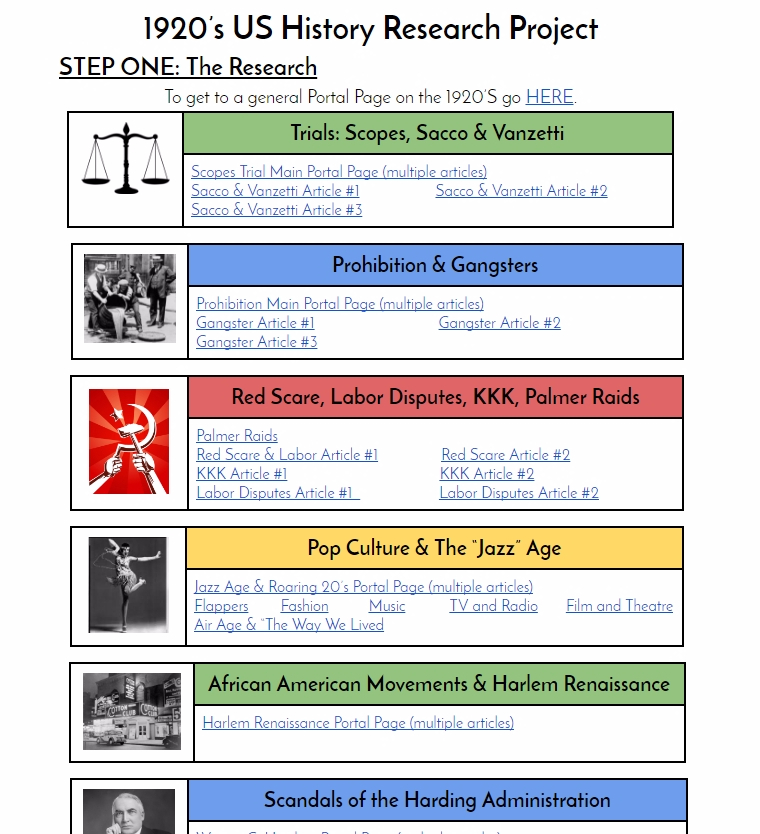
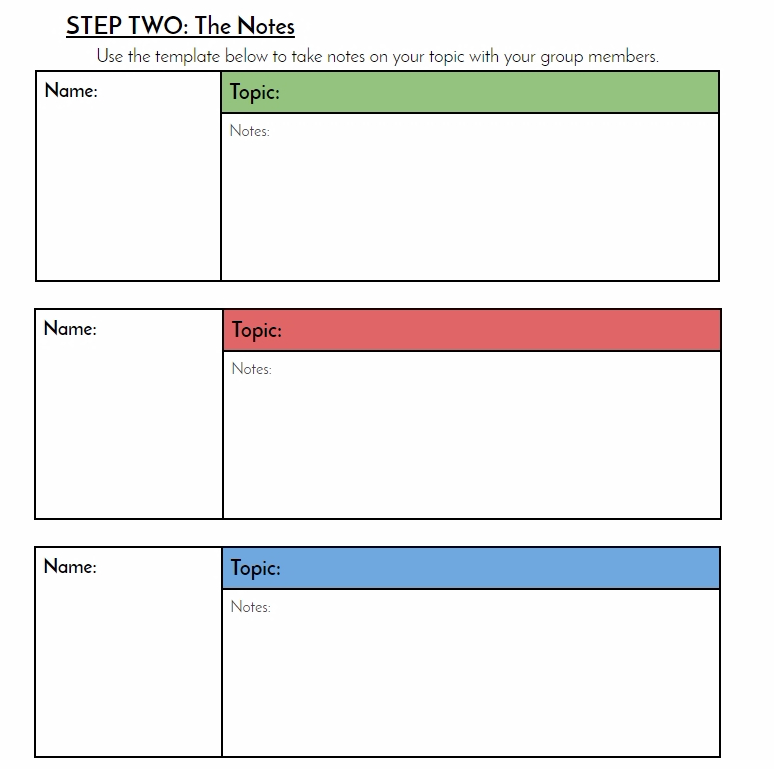
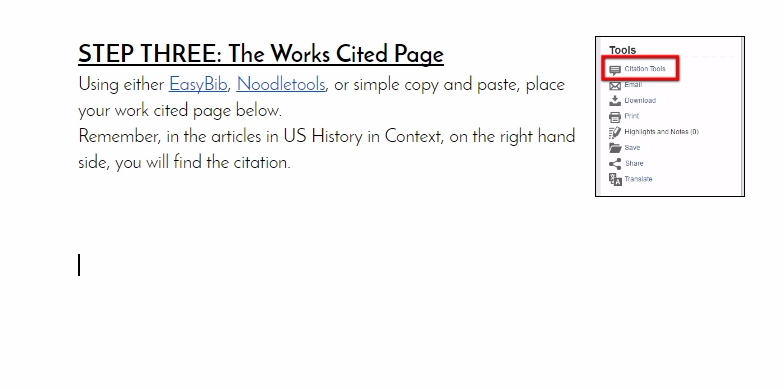
One example of a librarian exploring HyperDocs is Jennifer Zimny. In her blog post, The Librarians HyperDoc, Jennifer shares a before and after experience using the HyperDocs model to transform a US History lesson that relied heavily on Gale’s US History in Context–the decisions she made about allowing learners room to explore within the rich database, as well as how to encourage and scaffold collaboration and knowledge building:
I did not link EVERY article on these topics. They still have more they could explore, search, etc. through this database. At least these links get them in and interested in using this source. I found students were no longer on Wikipedia to get an overview of these topics. They were on our database instead! Plus, it allowed me to guide those students with more difficult topics right to sources that would help them . . . You can see the next page was a notetaking page. So one person in the group would make a copy of the worksheet if they wished and share it with their group members to put all their notes in one spot.
Overall, this HyperDoc was a total hit! Students immediately went to the HyperDoc and started using good reliable resources to start! Wikipedia became a supplementary resource, not their main one.
No need to start from scratch . . .
The HyperDocs Templates page shares a variety of strategies to ease into the process. Teachers are encouraged to make copies of these templates and customize from among five models.
Tag your lesson with many keywords so that it can be easily found when using the search feature. You can tag by content area, grade level, topic, web tool used, and lesson type.
Before you submit a link to your lesson, make it view only and take off any links to your personal student work.
Mark the document with ‘Created By’ and include your name.
The job outlook in 2030: Librarians will be in demand
Rebecca T. Miller,
Dec 07, 2017
According to "The Future of skills: Employment is 2030", there will be an increased call for librarians, curators, and archivists, among other occupations.
CAREERS
The job outlook in 2030: Librarians will be in demand
Rebecca T. Miller,
Dec 07, 2017
According to "The Future of skills: Employment is 2030", there will be an increased call for librarians, curators, and archivists, among other occupations.
CAREERS
The job outlook in 2030: Librarians will be in demand
Rebecca T. Miller,
Dec 07, 2017
According to "The Future of skills: Employment is 2030", there will be an increased call for librarians, curators, and archivists, among other occupations.
Log In
Don't have a School Library Journal Account?
Register Now
Thank you for registering. To have the latest stories delivered to your inbox, select as many free newsletters as you like below.




 The concept of






Add Comment :-
Be the first reader to comment.
Comment Policy:
Comment should not be empty !!!