


2018 School Spending Survey Report
Four nifty ways to display and curate Twitter
Tweetdeck and other third-party applications are fine for everyday Twitter use. But if you'd like to share your stream in a presentation, Joyce Valenza shows you how to display messages and hashtags in four attractive formats.
Our Twitter feeds and searches and Tweetdeck display panels are just fine for everyday purposes, but for special occasions–conferences, meetings, professional development, and, perhaps, classes, you may want to dress up your feeds.
These four tools allow you to display @signs and hashtags in more attractive, perhaps more usable, ways. I’ll demonstrate with #tlchat
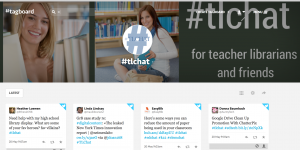
Tagboard (https://tagboard.com/) is a cross-network aggregator, grabbing hashtags from Twitter, Facebook, Vine, Google+, and Instagram to create a visual mosaic. Use it as a search tool or create a community by facilitating better conversation with administrative tools. Click on “latest” for updates. Create a tagboard to cultivate or customize boards for your favorite hashtags with banners, buttons and specified settings.


Twitterfall: After signing into your Twitter account, Twitterfall allows you to watch tweets as the drop on a screen. A suite of sophisticated features allow you to filter for location, adjust speed and size, exclude words, select language, eliminate retweets, load Twitter lists, display in full width or presentation mode, and add a heading.


Visible Tweets updates tweets every five minutes in a spectrum of colors, in your choice of letter-by-letter, word cloud or rotation displays–a great backdrop for a meeting.


TweetBeam is a beautiful, interactive Twitter visualization. Tweets load real-time on a wall of avatars. Click on avatars to reveal their recent tweets. You may create and customize a wall for any topic, hashtag, or your own timeline.


And, if you are simply searching for tweets, don’t forget the serious power of Twitter’s own Advanced Twitter Search


Added To Cart
RELATED


RECOMMENDED
CAREERS
The job outlook in 2030: Librarians will be in demand
CAREERS
The job outlook in 2030: Librarians will be in demand
ALREADY A SUBSCRIBER? LOG IN
We are currently offering this content for free. Sign up now to activate your personal profile, where you can save articles for future viewing
ALREADY A SUBSCRIBER? LOG IN
Thank you for visiting.
We’ve noticed you are using a private browser. To continue, please log in or create an account.
Add Comment :-
Be the first reader to comment.
Comment Policy:
Comment should not be empty !!!