


2018 School Spending Survey Report
Flipped, Blended, or Stirred: Using Video to Enhance Learning in the Classroom | Tech Tidbits
Video in the classroom is a promising, effective tool for student and teacher learning and education. Colorado teacher librarian Phil Goerner shares some tips on how to use digital video resources in the classroom.
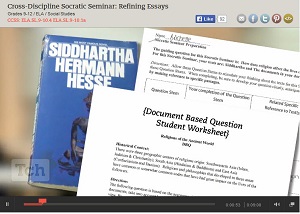 In the blended classroom venue, my teachers have been asking for tools they can use to create tutorials or screencasts, enhancing their online presence. Some teachers are creating screencast tutorials in YouTube and organizing them using Google Playlist, which makes it easy for teachers and students to locate. Another example is the creation of video tutorials explaining the use of databases or ebook access, which are then posted on the library website or in the teacher’s Google Classroom or Blackboard class. Some of my teachers have their students create video tutorials, which can be posted on a blog or website for other students and parents. Any teacher can attest to the fact that they learn their subject best when they have to break it down into steps in order to teach it to others. Students, too, learn more as they create the videos and explain processes.
 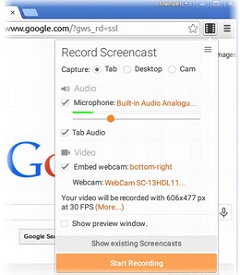 Each video tool meets a need and this month, I’d like to share my top favorite video tools starting with two very nice Chrome extensions, which do screen capturing. Screencastify is a video screen capture program that stores video in a special folder in Google Docs. It also has the option to embed webcam videos, which might be you explaining some process or concept to your students. Snag It is also a Chrome app and extension that allows users to capture and manipulate still images from their screens, as well as capture video with narration. Touchcast is a great tool to create an interactive video that allows users to click active hyperlinks right in the video to view and manipulate online information. To create a Touchcast, the user must download software for PC or Mac platforms, but it is well worth it. There are also educational Touchcasts available on the site that can be viewed before creating your own. This is a great tool for blended classrooms, as seen in this example of interactive video for education. Edpuzzle is a YouTube annotation tool for creating or editing YouTube videos by clipping the source, and adding narration, quiz questions and comments. Teachers can add students to their virtual Edpuzzle classroom, view which students have completed the video lesson, and post grades. This free resource was created by math teachers in Barcelona, Spain; check out the great video introduction to Edpuzzle. There are so many ways to use video in the classroom. You can individualize instruction, show classroom procedures, create professional development tutorials, assign student-created videos to demonstrate learning, or even use video as a tool for reflection. Next month, I’ll share some tutorial creation tools that are fantastic, and easy to use. These video tools and their uses in education are getting stronger and stronger. The right one is waiting just for you!
 Phil Goerner is a teacher librarian at Silver Creek High School, Longmont, CO.

Added To Cart
RELATED


RECOMMENDED
CAREERS
The job outlook in 2030: Librarians will be in demand
CAREERS
The job outlook in 2030: Librarians will be in demand
ALREADY A SUBSCRIBER? LOG IN
We are currently offering this content for free. Sign up now to activate your personal profile, where you can save articles for future viewing
ALREADY A SUBSCRIBER? LOG IN
Thank you for visiting.
We’ve noticed you are using a private browser. To continue, please log in or create an account.
Add Comment :-
Comment Policy:
Comment should not be empty !!!
SAT Prep
Good SAT Prep notes: http://clarityed.com/test-prep/sat/Posted : May 11, 2015 07:16
Reina
Medical tourism is growing at an amazingly fast rate. The extremes of the landscape, beyond the natural comforts of human life, give way to monstrous mountains, azure blue lagoons, and glaciers that date back millions of years. For some of us our first coffee memory is the Juan Valdez coffee advertisements; so naturally when we saw our first Cartagena Juan Valdez Caf.Posted : Mar 06, 2015 01:37
Meg Newsome
What can you tell me about http://mission100percent.com/, mentioned in this article? Is there a review of this resource I haven't located?Posted : Feb 20, 2015 11:58