


2018 School Spending Survey Report
Disney Animated | Touch and Go
An awe-inspiring new app from Touch Press offers a look at the history of animation through all 53 of Disney's animated productions. For students, there's a lot to learn here about crafting a good story in any medium.
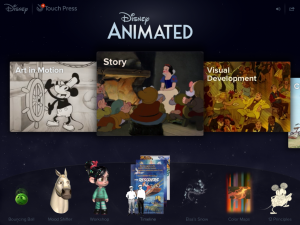 Whether you’re three or ninety-three, chances are you’ve marveled at the wizardry behind a Disney film. For those who’ve always been curious, Disney Animated (Walt Disney Animation Studios, Disney Interactive, Touch Press; $9.99; Gr 4 Up) offers a unique opportunity to explore a veritable treasure trove of rarely seen information about the history of the production process underlying all 53 of Disney’s animated features, from Snow White and the Seven Dwarfs (1937) to Frozen (2013). The collection is immense, with over 750 interactive illustrations, 400 animation clips and 350 images, most of which are “super-zoomable” and/or rotatable. Budding animators, film buffs, and children alike will find the accompanying interactive workshops a delightfully engaging way to discover how real animators work.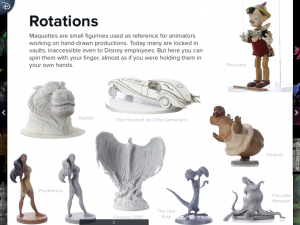
Interior screen, 'Disney Animated' (Touch Press) David A. Bossert
Navigation is remarkably intuitive, requiring mostly just swipes, taps, pinches and zooms. The landing page is horizontally divided with a carousel of chapters about the animation process across the top and a set of interactive workshops across the bottom. Chapter pages come to life through fun, stretchy text, frame-rate controllers, frame-sequence sliders, and scene layer manipulators. The interactive workshops include tools for creating snow effects (Frozen), “mood-shifting” the face of Maximus (Tangled), and animating and sharing a 3D model of Vanellope (Wreck-It Ralph); a scrollable timeline (1937-2013) with posters, synopses, trailers, song samples and scene clips for each film; and the astounding “Color Maps”–a “mega-compressed” snapshot of strips of the predominate colors in scenes from all of the released films–that can be tapped to select images and clips from any individual film. The price and download size of this premium app may be a bit hefty, but the rewards are great.–Kathleen S. Wilson, NYU/Tisch School of the Arts, New York, NY For additional app reviews visit our Touch and Go webpage.
Added To Cart
RELATED


RECOMMENDED
CAREERS
The job outlook in 2030: Librarians will be in demand
CAREERS
The job outlook in 2030: Librarians will be in demand
ALREADY A SUBSCRIBER? LOG IN
We are currently offering this content for free. Sign up now to activate your personal profile, where you can save articles for future viewing
ALREADY A SUBSCRIBER? LOG IN
Thank you for visiting.
We’ve noticed you are using a private browser. To continue, please log in or create an account.

Add Comment :-
Be the first reader to comment.
Comment Policy:
Comment should not be empty !!!