


2018 School Spending Survey Report
Teen Maker Space Outreach: Behind the Scenes With Karen Jensen
Highlights of a Teen Librarian Toolbox series with practical tips on how to make text-transfer speech bubbles, a photo booth, custom postcards, and more.
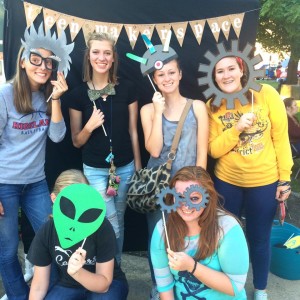 Once you have all your pieces cut to the correct size, setting up is easy. We sized our cross bars so our width can be either three feet across, which fits one person, or five, which accommodated groups pretty well. You will need at least two staffers to set up and take down the booth. I also recommend making step-by-step photo instructions. If you are outdoors, wind can be an issue; you may need a stabilizing agent. Why make your own props? I figured since we are a Teen MakerSpace, it made a lot of sense. While this was more expensive than buying pre-made props, it was a great community activity. Teens gave us input on what they wanted to make and were engaged every step of the way. It takes about $50 in supplies and two days to make 20 props.
 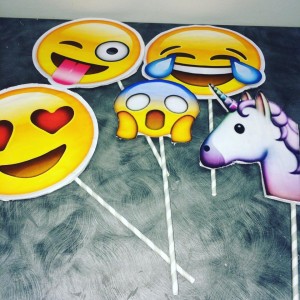 To create the emoji props, teens simply enlarged emoji icons on a computer, printed, cut them out, and glued them to foam core. Then, they cut the decorated foam core pieces and glued them to a stick. Amazingly simple.
 DAY FOUR: TEXT TRANSFER CHALKBOARD SPEECH BUBBLES
Text transfer is the process of printing out a text and transferring it to another surface or medium. In this case, we printed onto signs mostly made with chalkboard paper. Supply list:- A laptop/computer and printer
- Chalkboard scrapbook paper
- Chalk markers (different than chalk)
- A sharp pencil
- A ballpoint pen
- Dowel rods
- A hot glue gun
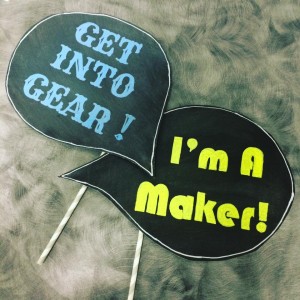 You print out the words you want from the computer, choosing a fun font, and transfer them onto your signs, which are covered with chalkboard paper. You can also use regular paper and markers or gel pens. Check out my full post for details.
 DAY FIVE: TEEN COLORING POSTCARDS
Our maker space has a variety of coloring sheets, along with some high-quality colored pencils, fine tip markers, and—after requests from our teens—a large assortment of gel pens. I recently went to a very cool crafters' conference that featured coloring postcards. I thought, "I can do that." I did, and I'm quite happy with the finished product. I designed the postcard in Canva, which has a preset postcard size that worked well. The most difficult part was trying to find image outlines with areas to color in, as opposed to actual graphics. I downloaded my image and laid it out in a four-part piece in Microsoft Publisher, so I had a master to photocopy onto thick card stock. If you have a button maker, you can use portions of coloring sheets to make fabulous buttons. We have American Button Machines button makers, and we adore them.
Added To Cart
RELATED


RECOMMENDED
CAREERS
The job outlook in 2030: Librarians will be in demand
CAREERS
The job outlook in 2030: Librarians will be in demand
ALREADY A SUBSCRIBER? LOG IN
We are currently offering this content for free. Sign up now to activate your personal profile, where you can save articles for future viewing
ALREADY A SUBSCRIBER? LOG IN
Thank you for visiting.
We’ve noticed you are using a private browser. To continue, please log in or create an account.
Add Comment :-
Comment Policy:
Comment should not be empty !!!
Tara Pennington
Hey Karen Jensen, Would you be willing to email me a digital version of your staff handbook you made and featured in this article? Just curious what you included as I'm looking to start a blitz hour in my LMC or a teen maker space as a club. Thanks so much!Posted : Nov 12, 2016 12:37